Your search engine can return results without the answer when a user asks for it in words that never appear in your documents. Suppose that the words in your staff handbook are 'parental leave' throughout. A keyword search for 'time off for a new baby' then returns nothing from the handbook, since the two phrases share no word that the engine scores. With vector search, you can close that gap.
Before you pay to close it, try the test at the end of this article. In one recorded run over two public corpora, vector search on its own scores below keyword search on both corpora, whereas the fused ranking of the two scores above both. With the test, you can find out which of those results you get on your own corpus, and what you pay to serve a second retrieval method.
Why keyword search depends on the exact words in your documents
A keyword engine matches only the words that appear in your documents, whatever the size of the pieces and whatever the setting of k1 and b. I cover two limits in this study: where you cut your documents, which I go into in the previous article, and this limit of vocabulary, which is the second.
In vector search, the engine works from a different signal. An embedding model takes a piece of text and returns a list of numbers. That list is the text's embedding. For two texts about similar subjects, the model returns two lists that are close together. When you search, you embed the question with the same model, so that the engine can return the documents whose embeddings are nearest to it. Since the model returns close lists for texts about similar subjects, the list for 'time off for a new baby' can be near the list for 'parental leave', although the two phrases share no word.
When you search on meaning, however, the engine also returns documents that are about the subject of the question without containing its answer, which means that it can rank wrong candidates near the top.
One run, three ways of searching the same documents
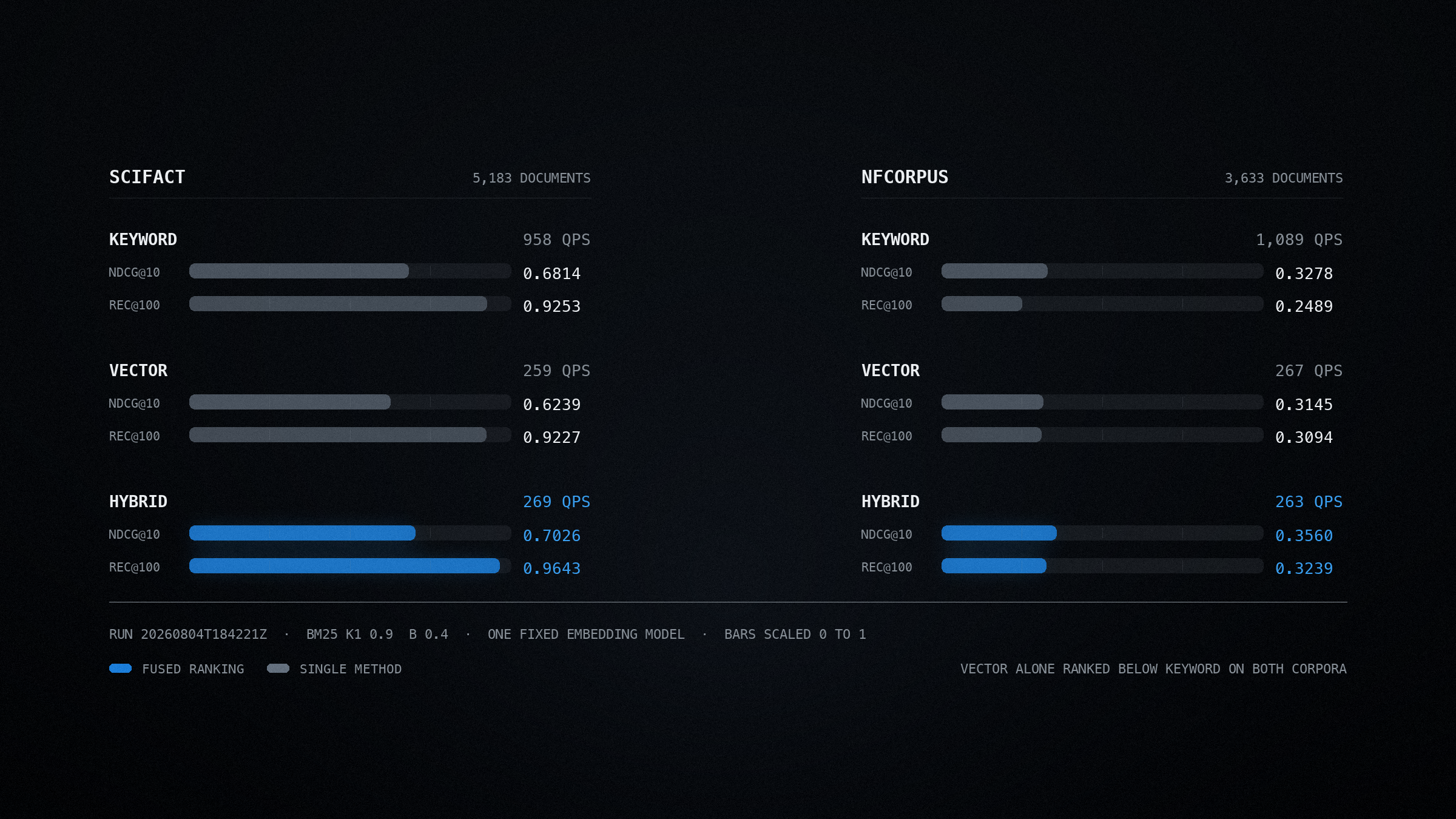
The figures below come from the benchmark run of 28 September 2026 over two BEIR datasets, SciFact with 5,183 documents and NFCorpus with 3,633. For the keyword rows, I use BM25 with k1 at 0.9 and b at 0.4, which is the Anserini reference configuration, so the keyword side of the comparison is calibrated. For the vector rows, I use one fixed embedding model, all-MiniLM-L6-v2. For the hybrid rows, the engine fuses the two rankings by the position of each document in them.
| Dataset | Retrieval | nDCG@10 | Recall@100 | Peak QPS |
|---|---|---|---|---|
| SciFact | Keyword | 0.6814 | 0.9253 | 4,200 |
| SciFact | Vector | 0.6239 | 0.9227 | 2,824 |
| SciFact | Hybrid | 0.7026 | 0.9643 | 2,602 |
| NFCorpus | Keyword | 0.3278 | 0.2489 | 4,940 |
| NFCorpus | Vector | 0.3145 | 0.3094 | 2,744 |
| NFCorpus | Hybrid | 0.3560 | 0.3239 | 2,633 |
SciFact, 5,183 documents
Keyword
4,200 QPS
Vector
2,824 QPS
Hybrid
2,602 QPS
NFCorpus, 3,633 documents
Keyword
4,940 QPS
Vector
2,744 QPS
Hybrid
2,633 QPS
The vertical line in each bar on the vector and hybrid rows is at the keyword score.
Vector search ranks below keyword search on both corpora. However, once the engine fuses the two rankings, the score rises above keyword search on both. With the vector side on, Narsil keeps between 53 and 67 per cent of its keyword throughput, while Elasticsearch and OpenSearch in the same run keep between 59 and 80 per cent of theirs.
Start with the vector rows, since whether you spend the money depends on them. On SciFact, vector search scores 0.6239 on nDCG@10 against 0.6814 for keyword search. Its recall@100 is lower as well, at 0.9227 against 0.9253, which means that on that corpus you lower both measures when you swap BM25 for embeddings.
On NFCorpus, vector search has the higher recall. Although it still ranks below keyword search there, at 0.3145 against 0.3278, its recall@100 rises from 0.2489 to 0.3094, which is 24 per cent more of the marked answers inside the top 100. With embeddings, the engine returns documents that keyword search never returns, but it ranks them badly.
When the engine fuses the two rankings, it keeps that recall and ranks the documents better. On NFCorpus, hybrid retrieval scores 0.3560 on nDCG@10 with recall@100 at 0.3239, which is ahead of keyword search by 8.6 per cent on the ranking and by 30 per cent on the recall. On SciFact, too, it scores ahead of keyword search on both measures, at 0.7026 and 0.9643.
The question for your own corpus is therefore narrower than whether embeddings work. Ask whether your corpus is more like NFCorpus, where the engine returns answers with vector search that it never returns with keyword search, or more like SciFact, where both measures and the throughput fall once you switch to vector search.
These numbers come from one embedding model
Every vector and hybrid figure above comes from one fixed embedding model over these two corpora, which means that with a different model you get different figures for all of them. The part that you can rely on is the pattern, which is that on both corpora the ranking improves with vector search only in combination with keyword search.
What you pay for the second method
Start with the throughput column, because I measure every figure in it on one machine with one engine. Narsil processes 4,200 keyword queries a second on SciFact and 4,940 on NFCorpus. With the vector side switched on, its vector and hybrid figures are between 2,602 and 2,824 queries a second on SciFact and between 2,633 and 2,744 on NFCorpus, which means that the engine keeps between 53 and 67 per cent of its keyword throughput. On SciFact, and for hybrid search on NFCorpus, the benchmark's own client processes reach their limit before Narsil does, which means that Narsil's peaks there are higher than the figures in the table.
When I measure Elasticsearch and OpenSearch on the same machine in the same run, they keep between 59 and 80 per cent of their own keyword rates. The size of the drop therefore varies from engine to engine, which means that you can plan only against the figure that you measure on your own hardware.
Three further costs are outside the benchmark table. An embedding model has to process every document that you index and every query that you answer, which is compute on top of the compute for keyword search. You also have to store the vectors that the model produces alongside the text. If you change the embedding model later, you have to re-embed the whole corpus, because the vectors from one model are incompatible with another model's space. A change that is otherwise an edit to a configuration file therefore becomes a full reindex.
The ranking gain has to be worth those three costs. On SciFact in this run, the gain from vector search on its own is already negative before I count any of them.
The model that reorders your shortlist
Your search engine returns a shortlist, which a second-stage model can reorder before you pass it on. That second-stage model is called a reranker. It scores each candidate against the question more closely than the first-stage engine can, because it processes only the shortlist. Since it only reorders what the first search returns, it can raise the precision at the top of the list, although the recall stays exactly the same.
Nandan Thakur and colleagues build five retrieval datasets from community questions over code and technical documentation, in FreshStack (April 2025). On two of those five topics, they report that the reranking step scores no higher than the first-stage retrieval that it reorders. Abdelrahman Abdallah and colleagues then evaluate 22 reranking methods across 40 variants on TREC DL19, DL20, BEIR, and a set of queries that are new to the models, in an August 2025 empirical analysis. They report that rerankers built on large language models outperform the others on familiar queries, although they generalise unevenly to novel ones. They also report that lightweight rerankers are comparably efficient.
Test a reranker, therefore, in the way that you test a chunk size, on your own judged set. Measure precision at the depth that you pass forward, since recall is the one number that a reranker can't change.
The test to carry out before you pay
Repeat the experiment from the previous two articles once more, with the retrieval method as the one variable that you change.
- 1
Search the same index with all three methods
Use the same documents, the same split, the same questions, and the same relevance marks, and change only whether the search is keyword, vector, or the two fused. If you change the chunking as well, you measure two changes at once, with no way to attribute the result to either of them.
- 2
Count the questions for which only vector search returns an answer
List the questions where a marked answer is inside the results that you pass forward with vector search but outside them with keyword search. That count is the number of answers that your users gain from embeddings, which is a truer measure of the gain than the gap between the two average scores.
- 3
Read those questions one by one
If those are the questions that users phrase in words that never appear in your documents, your corpus has a real vocabulary gap, which vector search can close. If they follow no pattern, the gain is probably noise, and you are unlikely to see it again with a second set of questions.
- 4
Price the throughput that you lose
Measure queries per second on your own hardware with the vector side switched on and then switched off. In this run, the three engines that I measure with all three methods keep between 53 and 80 per cent of their keyword throughput once the vector side is on, which is why your own figure is the one to plan against.
Where these numbers come from
Every benchmark figure in this article comes from the Narsil benchmark suite on 28 September 2026. Every engine has the same memory limit and returns the same number of results for each question. The suite measures one engine at a time so that each engine has the machine to itself. The suite measures throughput at 1 to 64 concurrent clients and reports the peak for each engine. For vector and hybrid search, every engine indexes identical precomputed vectors from one fixed embedding model, which means that the differences between those figures come from the indexes alone. A script fills the published tables from the raw results.
Read the benchmarks and reproduction stepsWhat you can prove now
I open this study with an agent that provides wrong answers in wording that sounds certain.
You can now put a number on what your search step returns, and defend that number to somebody who doubts it. Recall at the depth that you pass forward is the figure to fix first, because each later stage processes only the passages that your search returns. When you test two splits against the same marked questions, you can tell a chunking limit from a vocabulary limit on your own corpus. After the comparison above, you can also price embeddings against a keyword baseline that you measure yourself.
The answer may well be that once you calibrate keyword search and give it sensible pieces, it already returns the answers to your users' questions, in which case you get more from spending the money elsewhere. SciFact is one corpus where that holds in the run above.
Your agent may still generate a poor answer out of good passages, and you need a different repair for that. What you can rule out now is the failure underneath it, where your search never returns the answer while the query appears in your logs as a success.
Updates
In the version of 7 September 2026, I write that the engines keep from a quarter to over four-fifths of their keyword throughput, and I cite run 20260804T184221Z. The range is now 53 to 80 per cent, and I cite run 20260928T002255Z.
Go to this section: The test to carry out before you pay